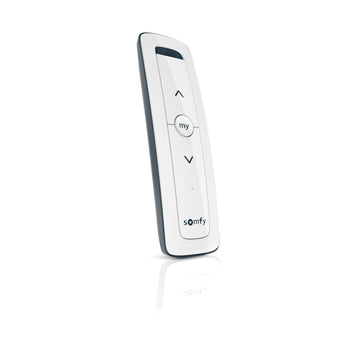
Finish every module, pass the quiz, unlock 10% off
Module 1 of 4
What the URTSI II does
The bridge between a control system and RTS motors. After this module you can explain where a URTSI II fits on a job.
3 lessons, then a scenario check.

Shade Motors School · Wired and Networked · 301
The URTSI II lets a control system talk to RTS motors. Learn what it converts, how many channels it gives you, where to mount it, how to program a channel and how its serial commands are built.
Pass the quiz to unlock 10% off your first ShadeMotorsDirect order. Your code and certificate arrive by email from Shade Motors School.
You will be able to: Mount, power and program a URTSI II, and write the serial commands a control system sends to it.
Inside this course
Finish every module, pass the quiz, unlock 10% off
Module 1 of 4
The bridge between a control system and RTS motors. After this module you can explain where a URTSI II fits on a job.
3 lessons, then a scenario check.
What the URTSI II does
Somfy describes the URTSI II as converting RS232, RS485 and IR commands into RTS radio commands. The control system talks wired; the motors hear radio.
ExampleA home automation processor with an RS232 port runs RTS shades through one URTSI II.

What the URTSI II does
One URTSI II gives 16 RTS channels. Somfy says up to 16 units can be linked for 256 channels.
On the jobCount shades and groups before you order. A big house may need a second unit.
What the URTSI II does
Each channel acts like an RTS remote, so it pairs to RTS motors such as the Sonesse ULTRA 506A2 RTS (1002562).
Watch forA Zigbee or wired motor will not hear the URTSI II. It speaks RTS only.

Check yourself
Hint: Wired in, radio out.
A URTSI II, which converts RS232, RS485 or IR into RTS.
Finish every module, pass the quiz, unlock 10% off
Module 2 of 4
What powers it and where it can live. After this module you can mount a URTSI II where it will reach the shades.
3 lessons, then a scenario check.
Power and placement
Somfy lists 9 to 15 V DC at 200 mA. A 9 V transformer comes in the box.
On the jobPlan an outlet near the rack or the mounting spot.
Power and placement
The instructions say not to mount the URTSI II in or on metal and not to remove the antenna. Somfy gives 65 ft as the optimal range.
Watch forA URTSI II inside a metal rack is the classic reason shades ignore it.
Power and placement
Range drops with walls and metal. Place the unit near the middle of the shades it serves, not at the far end of the house.
ExampleA unit in a central closet reaches both wings better than one in the garage.
Check yourself
Hint: Metal blocks radio.
Somfy says not to mount it in or on metal. Put it outside the rack with the antenna on.
Finish every module, pass the quiz, unlock 10% off
Module 3 of 4
How one channel learns one motor. After this module you can pair every channel on a job.
3 lessons, then a scenario check.
Program a channel
Put the motor in programming mode with power to that motor only. Turn the rotary switch to the channel, then press Program briefly, one second at most. The shade jogs.
On the jobWork one motor at a time. Other powered motors in programming mode can pair by mistake.
Program a channel
The switch shows 1 to 9, then A to F for channels 10 to 15, and 0 for channel 16.
Watch forChannel 16 is the 0 position, not F.
Program a channel
Use a remote already paired to the motor, such as a Situo 1 RTS (1870571), to put it into programming mode first.
ExampleHold PROG on the Situo until the shade jogs, then go to the URTSI II.

Check yourself
Hint: Count from A.
C. The letters A to F are channels 10 to 15.
Finish every module, pass the quiz, unlock 10% off
Module 4 of 4
How the control system tells a channel to move. After this module you can read and write a basic URTSI II command.
3 lessons, then a scenario check.
Serial commands
Somfy lists 9600 baud, 8 data bits, no parity and 1 stop bit for RS232 and RS485. The default address is 01.
On the jobSet the processor port first. Wrong baud is the usual cause of a silent URTSI.
Serial commands
A command is the address, the channel and the action. 0101U sends channel 1 up, 0105D sends channel 5 down and 0112S stops channel 12.
ExampleA scene that closes the living room sends one D command per channel.
Serial commands
On multi-unit RS485, the Wx wait command is mandatory, in 0.5 second steps. Up to 3 movement commands fit on one line. An IR channel stays active 3 minutes.
Watch forSkipping waits on a multi-unit bus makes commands collide.
Check yourself
Hint: Address, channel, action.
Address 01, channel 5, down.
Final quiz
Each question is a real job scenario, one per screen. Stuck? Tap the hint. You see the right answer and why right after you choose. Pass and you get a printable certificate.
Score 80% to unlock 10% off your first ShadeMotorsDirect order.
Question 1 of 10
On the job: An integrator asks what the URTSI II converts.
Hint: Wired in, radio out.
It converts RS232, RS485 and IR into RTS.
Question 2 of 10
On the job: A job needs 40 channels.
Hint: Sixteen each.
Three units give 48 channels.
Question 3 of 10
On the job: You plan power.
Hint: A small transformer.
Somfy lists 9 to 15 V DC at 200 mA.
Question 4 of 10
On the job: The rack is steel.
Hint: Metal blocks radio.
Somfy says not to mount in or on metal.
Question 5 of 10
On the job: You program a channel.
Hint: Short.
Somfy says briefly, 1 second max.
Question 6 of 10
On the job: Two motors are in programming mode at once.
Hint: Power one at a time.
Somfy says to power only the motor being programmed.
Question 7 of 10
On the job: You want channel 16.
Hint: Past F.
Position 0 is channel 16.
Question 8 of 10
On the job: You set up the processor port.
Hint: Standard.
Somfy lists 9600 baud 8N1.
Question 9 of 10
On the job: You read 0112S.
Hint: S is the action.
Address 01, channel 12, stop.
Question 10 of 10
On the job: Several units share an RS485 bus.
Hint: Avoid collisions.
Somfy says Wx is mandatory on multi-unit RS485.
Almost done
Your score shows on the next screen. If you pass, your certificate and 10% code go to this email. They come from Shade Motors School (school@shademotorsdirect.com). Check Promotions, Updates or Spam if you don't see them.
Parts used in this course
Parts used in this course
Your cart is currently empty.
Not sure where to start? Try these collections: