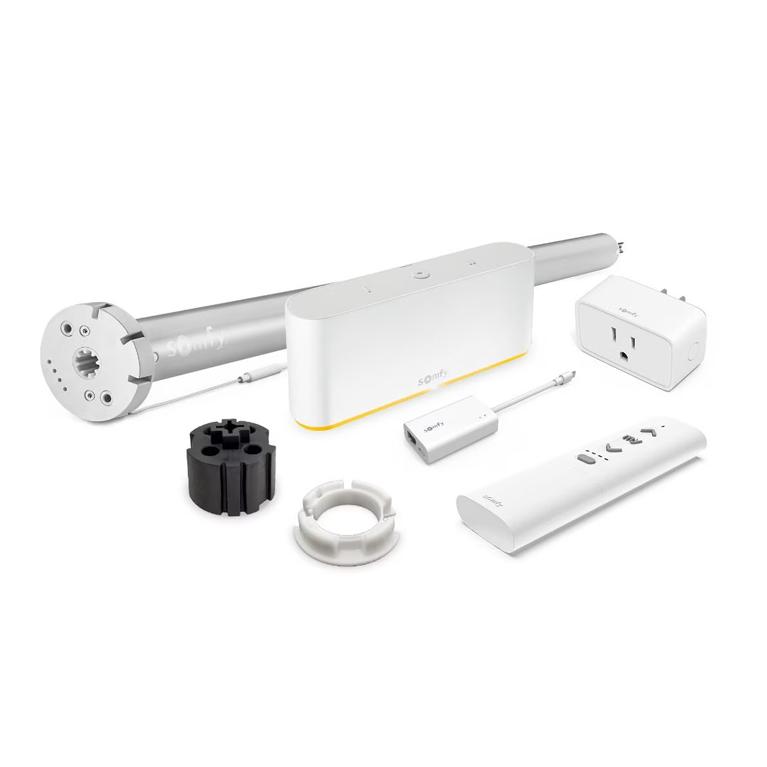
Short answer: The Somfy Zigbee module (9000043) turns a Glydea ULTRA 35 or 60 DCT drapery motor into a Zigbee motor. It pairs with those two DCT motors only, runs on 2.450 GHz, and installs and programs through the TaHoma pro app. After that, a TaHoma switch, Ysia Zigbee remotes or a supported control system can run the curtain.
Somfy builds the Glydea ULTRA as a platform. You pick the motor size for the drapery, then pick the control path. The Somfy Zigbee (2-Way) Module for Glydea ULTRA Motors (9000043) is the part that moves a dry contact Glydea ULTRA onto a Zigbee network. Order it with the right motor and the curtain joins the same app, hub and remotes that run your Zigbee shades.
The motor has to be a Glydea ULTRA DCT
Somfy lists two host motors for this module, and both are the DCT versions with the 10 ft plug:
- Somfy Glydea ULTRA 35 Motor DCT with 10' Plug (1246115) for lighter and mid-weight panels.
- Somfy Glydea ULTRA 60 Motor DCT with 10' Plug (1246117) for heavy, lined or very wide drapery. Somfy rates it at 1 Nm and 105 rpm.
The number in each name tells you the size class, so choose 35 or 60 from the fabric first. The module stays the same part across both.
Keep the RTS Glydea ULTRA motors out of this plan. An RTS motor already carries its own radio receiver, and the module pairs with the DCT versions only. The same goes for the battery Glydea ULTRA 50 WireFree Zigbee, which ships with Zigbee on board and needs no module at all.

Verified specs for the Zigbee module
The module is small and simple on paper. These are the figures that matter when you plan the job.
| Somfy name | Zigbee (2-Way) Module for Glydea ULTRA Motors |
| Part number | 9000043 |
| Host motors | Glydea ULTRA 35 DCT (1246115), Glydea ULTRA 60 DCT (1246117) |
| Radio frequency | 2.450 GHz Zigbee, two-way |
| Setup app | TaHoma pro |
| Protection index | IP 20 |
| Size | 1.45 x 0.67 x 1.99 in |
| Operating temperature | 32 to 140 F |
| Storage temperature | -22 to 176 F |
| Application | Interior draperies |
| Warranty | 5 years |
IP 20 means indoor use. Plan this module for curtains inside the conditioned space, with the motor on a track header that has an outlet nearby for the 10 ft plug.
Zigbee control paths once the module is in
Somfy builds the module as a two-way radio, so the motor and its controller talk in both directions. You have four practical ways to run a converted Glydea ULTRA.
TaHoma switch
Somfy lists the Somfy TaHoma switch (1871037) as compatible with the module. TaHoma runs schedules, scenes and sensor rules, and it bridges both RTS and Zigbee, so a converted curtain can open with RTS shades in the same scene. Somfy also publishes a programming guide for TaHoma by Somfy with Apple Home.
Ysia Zigbee remotes, no hub
Somfy publishes a separate guide for a standalone Zigbee setup using Ysia remotes. A Somfy Ysia 1 Channel Zigbee Remote (1871153) suits a single curtain. A Somfy Ysia 5 Channel Zigbee Remote (1871154) covers a room with drapery and shades on separate channels. Add TaHoma later and you keep the remotes.
Control systems through TaHoma
Somfy lists integration guides for RTI, Savant, Sonos and Josh.ai, each written for the TaHoma switch. For those projects the module plus a TaHoma switch puts the curtain on the integrator's touch panel or voice platform.
Stay on SDN instead
A building that runs Somfy Digital Network wiring takes a different module. The Somfy SDN RS485 Module for Glydea ULTRA Motors (1871412) is Somfy's wired counterpart, so choose one module per motor based on the network on site.
Setup goes through TaHoma pro
Somfy states that installation and programming of the module run through the TaHoma pro app. That app is Somfy's installer tool, so plan the commissioning visit with a phone or tablet that has TaHoma pro on it. Two Somfy documents cover the job, and you can find both through the Somfy documentation links on the product page:
- Programming Guide, TaHoma pro Manufacturer Version (V1.4), for pairing the module and setting the motor.
- Programming Guide, Zigbee Standalone Solution Using Ysia Remotes (V1.1), for a hub-free install.
Follow the guide that matches your control path. Button sequences and limit steps differ by setup, so take them from the Somfy guide rather than from memory. The Glydea ULTRA install guides sit in our Somfy spec and install library.
Mount the motor on the track and check the drapery runs free before commissioning. Snags and tight carriers show up as motor trouble later.
Converting a DCT motor or ordering RTS
A DCT Glydea ULTRA gives you options. It runs from a dry contact wall switch or a control system relay today, and the module adds Zigbee when the project calls for app control or two-way status. For an integrator, one motor SKU then covers wired and wireless jobs, and the module stays a small add-on part.
Homeowners get the TaHoma app, timers and sensor rules. Somfy points out that pairing the motor with sensors or timers helps manage energy use and protects furnishings from UV, and the Glydea ULTRA's quiet drive suits bedrooms and media rooms.
Already have a Glydea ULTRA DCT on site? The module adds Zigbee while the motor, track and carriers all stay in place.
Ordering a complete Zigbee Glydea curtain
A complete Zigbee curtain needs four pieces from the Somfy range:
- One Glydea ULTRA DCT motor, 35 or 60, sized to the drapery weight.
- One Zigbee module 9000043 per motor.
- A control: a TaHoma switch, a Ysia remote, or both.
- Track, carriers, master carrier and brackets cut to the opening.
Our Somfy Glydea drapery systems collection holds the motors, track and hardware in one place. For help choosing between the three Glydea ULTRA versions, read Glydea ULTRA 35 vs 60 vs 50. For the wider Zigbee picture, see Somfy Zigbee explained.
Ready to convert? Start with the Somfy Zigbee module 9000043, then add a TaHoma switch if the home does not have one yet.
FAQ
Does the Somfy Zigbee module fit a Glydea ULTRA RTS motor?
No. Somfy lists the Zigbee module 9000043 for two motors only, the Glydea ULTRA 35 DCT (1246115) and the Glydea ULTRA 60 DCT (1246117), both with the 10 ft plug. RTS Glydea ULTRA motors carry their own built-in radio receiver. For a Zigbee curtain, start from a DCT motor and add the module.
Do I need a TaHoma switch for a Zigbee Glydea ULTRA?
Not for basic control. Somfy publishes a standalone Zigbee programming guide using Ysia remotes, so a Ysia 1 or Ysia 5 remote can run the curtain without a hub. Add the TaHoma switch (1871037) for app control, schedules, scenes, Apple Home and the RTI, Savant, Sonos and Josh.ai integrations Somfy documents.
Which app sets up the Glydea ULTRA Zigbee module?
Somfy states that installation and programming run through the TaHoma pro app, its installer app. Somfy's Programming Guide for the TaHoma pro Manufacturer Version (V1.4) covers the module. Once the motor is set, the homeowner can run it from the TaHoma app, a Ysia remote or a supported control system.
Can I use the Zigbee module outdoors or on a patio curtain?
Plan it for interior drapery. Somfy rates the module IP 20 and lists interior draperies as its application, with an operating range of 32 to 140 F. The host Glydea ULTRA DCT motors also need an outlet within reach of their 10 ft plug, which suits an indoor track header.
Sources: Somfy Systems product page for the Zigbee (2-Way) Module for Glydea ULTRA Motors, ref. 9000043 (somfysystems.com), and the Somfy documentation it lists, including the TaHoma pro Manufacturer Version programming guide and the Zigbee standalone guide using Ysia remotes.
Shade Motors Direct is an authorized source for genuine Somfy motorized window shade, blind, and drapery parts.