Finish every module, pass the quiz, unlock 10% off
Module 1 of 5
Know the Telis 4 RTS Patio
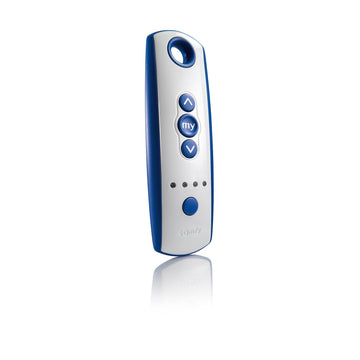
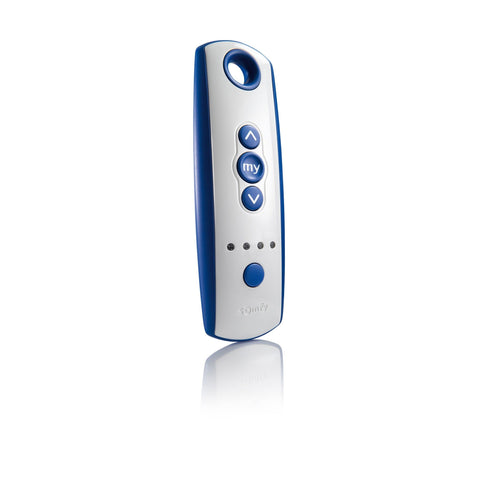
Find every button on the Telis 4 RTS Patio and read its four LEDs so you know which of its five channels is live.
5 lessons, then a scenario check.

Shade Motors School · Program It · 101
Learn the five channels, buttons and LEDs on the Somfy Telis 4 RTS Patio remote, then add it to an RTS motor and remove channels you no longer need. Save a favorite my position and fit the right battery using Somfy's published steps.
Pass the quiz to unlock 10% off your first ShadeMotorsDirect order. Your code and certificate arrive by email from Shade Motors School.
You will be able to: Set up a Telis 4 RTS Patio channel by channel, from pairing to favorite position to battery.
Inside this course
Finish every module, pass the quiz, unlock 10% off
Module 1 of 5
Find every button on the Telis 4 RTS Patio and read its four LEDs so you know which of its five channels is live.
5 lessons, then a scenario check.
Know the Telis 4 RTS Patio
Somfy rates the Telis 4 RTS Patio as a five-channel remote. Each channel runs one motorized product or one group, so you can cover five products or five groups.
ExampleAn awning, two patio screens and a pergola roof each get their own channel, and one channel stays free for a group.
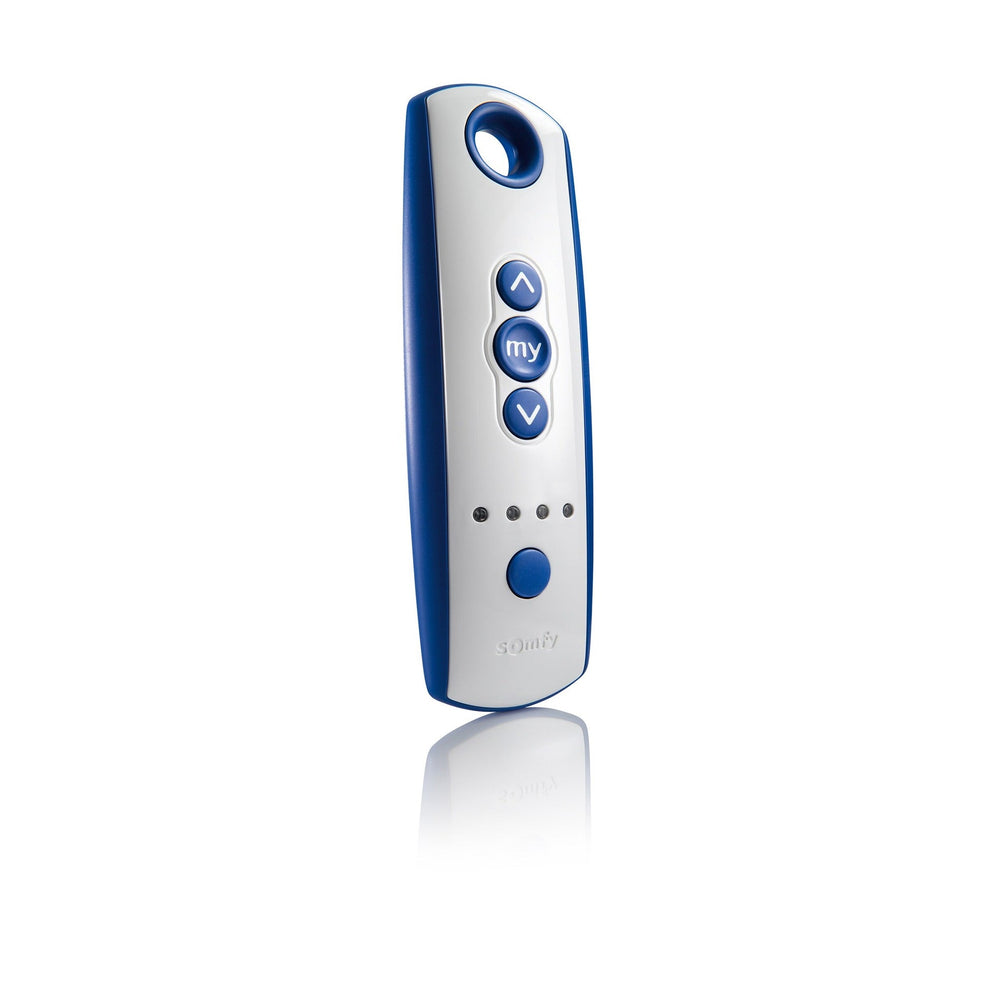
Know the Telis 4 RTS Patio
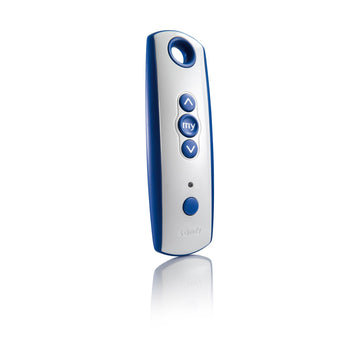
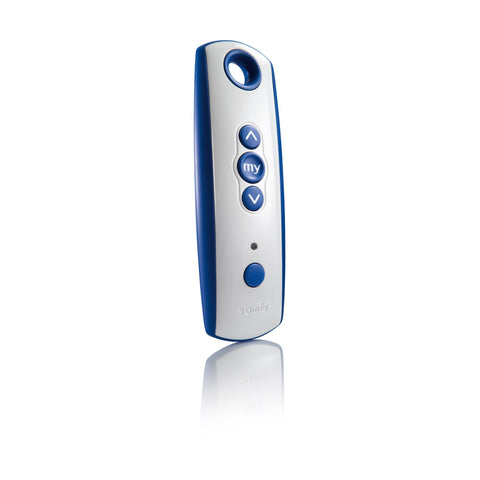
UP, my and DOWN run the shade. The channel selector picks the channel, the four LEDs show it, and the recessed PROG button on the back handles programming.
On the jobFlip the remote over to find PROG; Somfy recesses it on the back.
Know the Telis 4 RTS Patio
Channels 1 to 4 each light one LED. Channel 5 is active when all four LEDs light at once.
Watch forA customer who sees all four LEDs lit is on channel 5, which may be a group of every shade.
Know the Telis 4 RTS Patio
Somfy makes the Patio finish water and shock resistant with an IP 44 rating, in blue and white. That suits awning, patio screen and pergola control.
On the jobLeave the Patio remote on the deck table for the awning; an indoor remote stays inside.
Know the Telis 4 RTS Patio
The Telis 4 sends RTS on 433.420 MHz and pairs with RTS motors. A Zigbee motor or a wired motor without an RTS receiver will not respond.
Watch forRead the motor label before you sell the remote. RTS awning motors such as Sunea CMO RTS answer it.
Check yourself
Hint: Recall what Somfy says the LEDs show.
Channel 5. Somfy's guide says the fifth channel is active when all four LEDs illuminate.
Finish every module, pass the quiz, unlock 10% off
Module 2 of 5
Pick the right channel, then run the shade up, down, to a stop or to its favorite position.
4 lessons, then a scenario check.
Select a channel and run a shade
Press the channel selector until the LED shows the channel the shade is paired to. The LED lights on each press to show the selected channel.
On the jobBefore you climb a ladder for a dead screen, check which LED is lit.
Select a channel and run a shade
With the channel selected, press UP or DOWN to open or close the product. RTS is omni-directional, so you can press from anywhere in range.
ExampleFrom the kitchen door, select the awning channel and press UP to retract it.
Select a channel and run a shade
While the product moves, my stops it. While it sits still, my sends it to the saved favorite position.
On the jobShow the homeowner both uses before you leave, or they will think the button is broken.
Select a channel and run a shade
If the product is already moving, press my twice to divert it to the favorite position.
ExampleThe awning is extending all the way out; two presses of my send it to the half-shade spot instead.
Check yourself
Hint: Think about what the two products do not share on this remote.
The channel. Press the selector until the LED shows the channel the screen is paired to, then press UP or DOWN.
Finish every module, pass the quiz, unlock 10% off
Module 3 of 5
Pair a new Telis 4 channel to a motor using a remote that already works, and know where to go when no remote works.
5 lessons, then a scenario check.
Add the Telis 4 to a motor
On the previously paired remote, press and hold PROG on the back until the product jogs, a short up and down move.
On the jobOn a Telis 4 that already works, select the motor's channel before you hold PROG.
Add the Telis 4 to a motor
On the new Telis 4, assign the product to a channel with the channel selector. The LED shows the channel you chose.
ExampleThe awning gets channel 1 and the side screen gets channel 2, written on the customer's sheet.
Add the Telis 4 to a motor
Briefly press PROG on the new Telis 4 until the product jogs. That channel now runs the product.
Watch forSomfy's step calls for a brief press on the new remote. The press and hold belongs on the working remote.
Add the Telis 4 to a motor
For Sunea RTS CMO motors, the Pocket Guide says hold PROG on the already programmed remote until the awning jogs, then briefly press PROG on the remote to add.
On the jobOn a Sunea awning, add the Telis 4 the same way you would on a shade.

Add the Telis 4 to a motor
When no Telis remote has been paired, Somfy's instructions start at the motor's programming button. Use the pairing course for that path.
Watch forDo not reach for the motor button when a working remote is in the drawer.

Step by step
Somfy's Telis 1 and 4 Patio instructions give these steps for the Telis 4 when a previously paired Telis remote already runs the product.
3 steps, one per screen.
Step 1 of 3
The window covering moves up and down slightly, a jog.
Step 2 of 3
The LED lights on each press, showing the selected channel.
Step 3 of 3
The window covering jogs. It is now paired with that Telis 4 channel.
Check yourself
Hint: Recall the order Somfy gives when a paired remote exists.
The old Telis 1, the working remote. Hold its PROG until the awning jogs, then select the channel on the Telis 4 and briefly press its PROG.
Finish every module, pass the quiz, unlock 10% off
Module 4 of 5
Delete one Telis 4 channel from a motor without touching the others, and decide whether channel 5 runs one product or all of them.
4 lessons, then a scenario check.
Remove a channel and plan channel 5
The Pocket Guide says adding and deleting an RTS control use the same procedure. If the motor already knows the control, the same steps remove it.
On the jobBefore you press anything, confirm the channel you are removing really runs that product.
Remove a channel and plan channel 5
Somfy states step 1 should not be performed with the control intended for deletion. Start on a control you are keeping.
Watch forIf the Telis 4 is the only control on the motor, pair a second remote before you delete.
Remove a channel and plan channel 5
Each channel, 1 to 5, counts as its own control. Removing one channel from a motor leaves the other channels on that remote alone.
ExampleDelete channel 3 from the side screen and channels 1, 2, 4 and 5 keep working.
Remove a channel and plan channel 5
The Pocket Guide shows a mix of single-shade and group channels, with channel 5 running all motorized shades. Each motor has to be added to channel 5.
On the jobLabel channel 5 on the customer sheet so nobody sends every screen down by surprise.
Check yourself
Hint: Recall Somfy's step 1 rule when you delete a control.
Hold PROG on the owner's Telis 1 until the awning jogs, then select channel 2 on the Telis 4 and briefly press its PROG.
Finish every module, pass the quiz, unlock 10% off
Module 5 of 5
Save, use and clear the my favorite position on a Telis 4 channel, and fit the correct battery when the remote fades.
4 lessons, then a scenario check.
Set a favorite position and change the battery
Select the channel, use UP or DOWN to reach the spot, briefly press my to stop, then press and hold my until the product jogs.
On the jobSet the half-shade awning position with the homeowner watching so she can redo it later.
Set a favorite position and change the battery
On Standard RTS motors such as the Altus 50, briefly press my to go to the current position, then hold my for 5 seconds. A jog confirms the deletion.
Watch forHold my long enough. A short press only sends the product to the old spot.
Set a favorite position and change the battery
The Pocket Guide's Sunea RTS CMO section publishes no my position steps. Use the motor's own instructions before you change a Sunea favorite.
Watch forDo not carry Altus steps over to a Sunea awning.
Set a favorite position and change the battery
Loosen the screws on the back with a small screwdriver, remove the cover, and fit one 2430 lithium 3V battery. Somfy lists the type as CR2430, 3V.
On the jobCarry a CR2430 on every awning service call; a dead cell looks like a dead motor.
Check yourself
Hint: Recall what Somfy has you do after the product stops at the spot you want.
Select channel 1, run the awning to half extension with DOWN, briefly press my to stop, then press and hold my until the awning jogs.
Final quiz
Each question is a real job scenario, one per screen. Stuck? Tap the hint. You see the right answer and why right after you choose. Pass and you get a printable certificate.
Score 80% to unlock 10% off your first ShadeMotorsDirect order.
Question 1 of 10
On the job: A homeowner's patio has two screens, one awning and a pergola roof, all on RTS motors.
Hint: Count the channels Somfy publishes for this remote.
Somfy rates the Telis 4 RTS Patio as a five-channel remote, each channel for one product or one group.
Question 2 of 10
On the job: You press the selector and all four LEDs on the Telis 4 light up.
Hint: Check how Somfy maps five channels onto the LEDs.
Somfy's Pocket Guide states the fifth channel is active when all four LEDs illuminate.
Question 3 of 10
On the job: A customer wants to run a new Zigbee shade motor from the Telis 4 RTS Patio she already owns.
Hint: Think about the radio each one uses.
The Telis 4 is an RTS remote that pairs with RTS motors, so a Zigbee motor will not answer it.
Question 4 of 10
On the job: The awning is extending and the homeowner wants it to stop at its saved half-shade spot.
Hint: Recall what the my button does in each state of the product.
If the product is in motion, pressing my twice diverts it to the preset position.
Question 5 of 10
On the job: A patio screen will not move from the Telis 4, but the awning on channel 1 works fine.
Hint: Think about what differs between the awning and the screen on this remote.
Each command goes to the selected channel, so a screen on another channel will not move.
Question 6 of 10
On the job: An old Telis 1 runs an Altus RTS awning motor, and you are adding a new Telis 4.
Hint: Somfy's method depends on whether a paired remote already exists.
Somfy's steps start with a press and hold on the previously paired remote until the product jogs.
Question 7 of 10
On the job: The working remote has made the shade jog, and you are holding the new Telis 4.
Hint: Recall Somfy's second and third steps for the new remote.
Somfy's Telis 4 steps assign the channel with the selector, then a brief PROG press until the product jogs.
Question 8 of 10
On the job: A tenant's Telis 4 channel 2 has to come off an awning that also answers the owner's Telis 1.
Hint: Reread Somfy's note under step 1.
The Pocket Guide says step 1 should not be performed with the control intended for deletion.
Question 9 of 10
On the job: You want channel 5 to raise all four patio screens together.
Hint: Think about how a motor learns a channel.
Channel 5 runs only the motors added to it; the Pocket Guide shows it as an all-shades group when each motor is programmed to it.
Question 10 of 10
On the job: The Telis 4 has grown weak on a customer's awning, and you open the back cover.
Hint: Somfy lists the cell on the product page and in the instructions.
Somfy specifies one 2430 lithium 3V battery, listed as CR2430, 3V.
Almost done
Your score shows on the next screen. If you pass, your certificate and 10% code go to this email. They come from Shade Motors School (school@shademotorsdirect.com). Check Promotions, Updates or Spam if you don't see them.
Parts used in this course
Parts used in this course
Your cart is currently empty.
Not sure where to start? Try these collections: