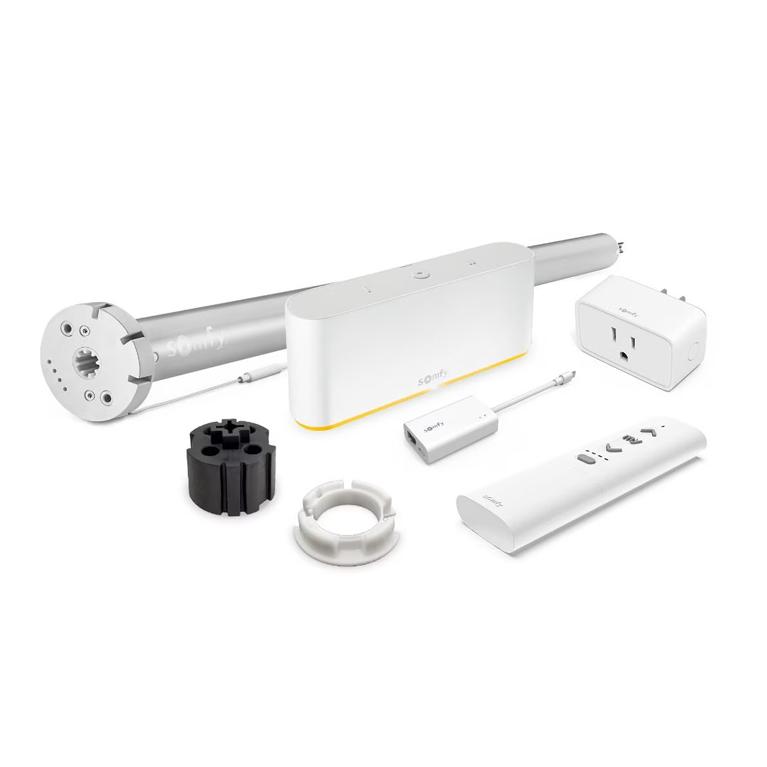
Short answer: Somfy lists myLink as obsolete and moves RTS control to TaHoma. On an integrator job, install the TaHoma Switch with Ethernet Adaptor 1871038. One hub runs 40 RTS channels and 60 Zigbee products, plugs into the LAN by wire, and talks to Control4, Crestron, Savant, ELAN, RTI and URC. Plan to pair every RTS channel again.
A dead myLink takes the shades out of the control system. The client presses a keypad, nothing moves, and the service call lands on you. The motors are fine. The hub is the part that failed, and Somfy no longer builds it. The fix is one new hub, a channel map and an afternoon of pairing.
Free spec package
myLink to TaHoma Switch Retrofit Drawing Set: 1871038 with Ethernet Adaptor

- SMD-01 general notes and system limits schedule with a source for every number
- SMD-02 TaHoma Switch elevation (published dims) and hub placement detail
- SMD-03 network riser, Ethernet adaptor connection detail and RTS channel map
- SMD-04 three-part guide spec language, BOM and a myLink retrofit checklist
myLink is retired. TaHoma takes its channels
Somfy's own online store marks myLink obsolete and names the TaHoma Gateway 1871387 as the replacement. That kit holds the RTS-only TaHoma gateway, sold here as the TaHoma RTS Interface 1811731. Somfy rates it for 40 RTS channels on a 2.4 GHz Wi-Fi network.
The integrator pick is the TaHoma Switch. It keeps the same 40 RTS channels and adds Zigbee 3.0 for Somfy Zigbee motors. It also takes a wired Ethernet adaptor, which the RTS-only gateway does not list. myLink topped out at 16 RTS channels, so one TaHoma Switch covers a full myLink with room to grow.
Two part numbers carry the switch. The TaHoma Switch 1871037 ships with its plug-in power supply. 1871038 is the same hub with the Ethernet adaptor in the box. Somfy backs both with a 5-year warranty.
Count channels before you order
Somfy's installation guide sets the limits per TaHoma Switch: 40 RTS channels, up to 60 Zigbee motors with no more than 50 of them WireFree, 10 smart plugs, 15 remotes and 40 scenes with schedules. Each RTS channel drives one shade or one group. Up to 10 switches join for multi-zone RTS control.
Pull the old myLink channel list first. If the app still opens, screenshot every channel name. If the hub is dead, walk the job with the client's RTS remotes and write down which shades each channel moved.
Our rule: one TaHoma Switch per zone that sits inside the 25 to 35 ft placement range. Large homes get a second switch on the far wing long before they run out of channels.
Wire it: Ethernet adaptor 9028054
Wi-Fi adds a failure point between the hub and the processor. The TaHoma Switch Ethernet Adaptor 9028054 removes it. Somfy's spec sheet lists a 10/100 Mbps RJ45 port, a micro-USB input rated 5 V at 2 A maximum, and a micro-USB output that feeds the switch. The adaptor sits between the power supply and the hub, so one cable carries power and the other carries data.
The switch itself takes 100 to 240 V AC at 50 to 60 Hz on its plug-in supply, with a 5 V DC, 2000 mA output on micro-USB. The adaptor shows a green LED for an Ethernet link and amber for data transfer. Read both before you leave the rack.
A job that started on a bare 1871037 does not need a new hub. Add 9028054 to the existing switch. Our rule: any job with a network rack gets the wired adaptor. A Wi-Fi hub on a control system is a support ticket waiting for a router swap.
Placement and network rules
RTS is one-way radio. Somfy's installation guide places RTS hubs 25 to 35 ft from the devices they control. The spec sheet sets an operating range of 32°F to 95°F, so keep the switch out of hot attics and closed AV closets. The hub body measures 6.37 in long, 2.65 in high and 1.33 in wide.
On the network side, the guide asks for a DHCP reservation by the switch's MAC address and third-party integration switched on in the TaHoma app. Third-party systems connect through the Somfy Synergy API. Savant needs Racepoint Blueprint 9.2.2 or newer and TaHoma Profile 1.5 or newer.
TaHoma Switch numbers to put on the drawings
- 40 RTS channels and 40 scenes with schedules per switch
- 60 Zigbee motors per switch, 50 of them WireFree at most
- Up to 10 switches joined for multi-zone RTS control
- Hub within 25 to 35 ft of the devices it controls
- Operating temperature 32°F to 95°F
- Ethernet adaptor 9028054: 10/100 Mbps RJ45, 5 V 2 A micro-USB
Pair every RTS channel again
An RTS channel lives in the hub that sent it. Somfy's guide says RTS devices programmed to a TaHoma channel receive commands only from the associated TaHoma switch. The reverse holds for myLink. Its channels leave the job with the old box, so each shade needs a new TaHoma channel.
The motor side follows Somfy's standard add-a-transmitter sequence. Press and hold PROG on a remote already paired to the shade, about 3 seconds, until the motor jogs. Then send the program command from the new TaHoma channel in the app. A second jog confirms the channel is recorded. Repeat for each shade or group.
Our rule: pair in the order of the channel map and name each channel in the app the moment it jogs. Driver discovery pulls those names into the control system, so clean names here save an hour of renaming later.
Swap the driver in the control system
The myLink driver comes out with the hub. Somfy's ELAN integration guide for TaHoma Switch shows the pattern: import the Somfy TaHoma driver, add one interface per switch, enter the IP address from the Integration Report, then enable the partner system in the TaHoma app under Menu, Partner systems. The status turns green when the link is up.
On Control4, Somfy's TaHoma driver exposes the RTS channels and scenes built in the TaHoma app. Build scenes and schedules in the app first, then bind them in the project. Crestron, Savant, RTI and URC follow the same order: hub online, channels named, integration switched on, driver added.
Some jobs want a hard serial port to the processor instead of IP. That design uses URTSI II, covered in our RTS integration guide for Control4, Crestron and Savant.
Take the spec package to your submittal
myLink to TaHoma Switch Retrofit Drawing Set: 1871038 with Ethernet Adaptor
- SMD-01 general notes and system limits schedule with a source for every number
- SMD-02 TaHoma Switch elevation (published dims) and hub placement detail
- SMD-03 network riser, Ethernet adaptor connection detail and RTS channel map
- SMD-04 three-part guide spec language, BOM and a myLink retrofit checklist
FAQ
Can a TaHoma Switch import my old myLink channels?
No. RTS channels live in the hub that sent them. Each shade gets a new TaHoma channel, paired with a remote that already controls it.
How many shades can one TaHoma Switch control?
Somfy rates it for 40 RTS channels and up to 60 Zigbee motors, with no more than 50 WireFree. Each RTS channel can drive one shade or a group.
Does the TaHoma Switch need Wi-Fi?
No. The 1871038 kit includes Ethernet Adaptor 9028054 for a wired 10/100 Mbps connection. The adaptor also passes 5 V power to the switch.
Which control systems work with TaHoma Switch?
Somfy lists Control4, Crestron, Savant, ELAN, RTI, URC and Brilliant, plus Alexa, Google Home and Apple Home. Third-party systems connect through the Somfy Synergy API.
Sources: Somfy product pages for 1871037, 1871038, 9028054 and 1871387 (somfysystems.com); Somfy TaHoma Switch spec sheet D-0150, March 2024; Somfy TaHoma Switch installation guide; Somfy ELAN Integration for TaHoma Switch, v1.1, October 2024; Somfy Control4 integration page; Somfy store listing for myLink; Somfy RTS programming pocket guide.
Ryan Towns writes the Somfy Integrator Guides for ShadeMotorsDirect, an authorized Somfy distributor. Questions on a spec or a retrofit: 859-414-6872 or colin@shademotorsdirect.com, 8:00 AM - 7:30 PM ET.